
[align=center]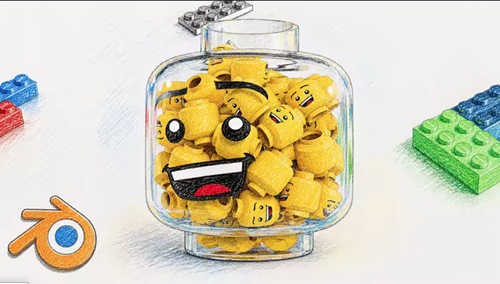
Blender Lego Head Animation || Full Process || 2026
Published 5/2026
MP4 | Video: h264, 1920x1080 | Audio: AAC, 44.1 KHz, 2 Ch
Language: English | Duration: 2h 1m | Size: 2.43 GB[/center]
Learn modeling, materials, lighting, animation, and compositing to create a clean Lego animation in Blender!
What you'll learn
Create a clean and realistic Lego head model from scratch in Blender
Build professional materials for plastic and glass objects
Set up studio lighting for high-quality product-style renders
Animate smooth and visually appealing product rotations
Use camera techniques like depth of field for cinematic results
Enhance final renders using compositing and color correction
Understand the full workflow from modeling to final render
Requirements
No prior Blender experience is required
Basic computer skills and ability to navigate software
Blender installed (any recent version)
A computer capable of running Blender smoothly
Willingness to learn and experiment with 3D tools
Description
Blender Lego Head Animation Course
Want to create clean, professional-looking 3D animations in Blender? In this course, you'll learn how to build a stylized Lego head product animation from scratch using techniques that can be applied to portfolio work, social media, or commercial projects.
What you'll learn
In this course, we go step by step through the full workflow
• Modeling a realistic Lego head with correct proportions and details
• Creating materials and shaders for plastic and glass
• Setting up studio lighting for clean reflections and highlights
• Building a smooth, product-style animation
• Working with camera, depth of field, and composition
• Using compositing to enhance colors, glare, and overall quality
By the end, you'll know how to turn a simple idea into a polished final render that looks like a real product shot.
Why this course stands out
This is more than just a typical Blender tutorial.
You'll develop the mindset of a 3D artist focused on product visualization and learn how to
• Create renders that look clean, polished, and professional;
• Manage lighting and reflections, especially for glass and plastic materials;
• Develop simple yet visually appealing animations;
• Present your work in a portfolio-ready manner.
After this course
You'll have a solid foundation to explore more advanced topics such as Geometry Nodes, physics simulations, advanced shaders, and cinematic animation techniques.
Who this course is for
Beginners who want to start learning Blender through a practical, project-based approach
Intermediate users looking to improve their lighting, materials, and render quality
Creators interested in product-style animations and clean visual presentation
Anyone who wants to build portfolio-ready 3D work
Designers, motion artists, or hobbyists who want to expand their 3D skills
https://rapidgator.net/file/1641b7fbdb5b4e9e6cad3fdc2d058860/Blender_Lego_Head_Animation_Full_Process_2026.part3.rar.html
https://rapidgator.net/file/468d5077674 … 2.rar.html
https://rapidgator.net/file/9438262eb32 … 1.rar.htmlhttps://nitroflare.com/view/D291E010891 … .part3.rar
https://nitroflare.com/view/7A2613EE7AE … .part2.rar
https://nitroflare.com/view/52F5BCCAB82 … .part1.rar

